Actualisation


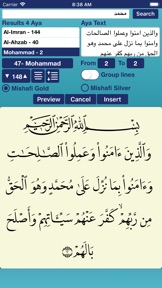
Captures d’écran iPhone



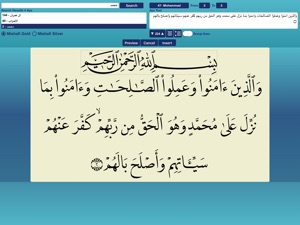
Captures d’écran iPad


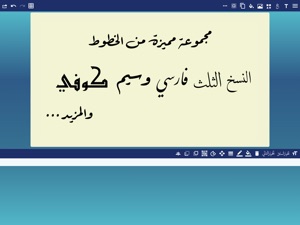

Description
Create Arabic calligraphy artwork that matches that of top calligraphers with CalliPro. It comes with unique features that allow the creation of an infinite number of creative designs that you can share or export.
- NEW! Add Text, Shapes, or both to a Favorites list.
- New! Edit the Text, Tashkeel, Shapes, and Glyphs as a path (full Edit Path features available as In-App Purchase).
- NEW! Show or hide touch gesture
- NEW! Insert Quranic text using Mishafi Gold or Silver with search capability (full Quran available as In-App Purchase).
- NEW! Inspect the glyphs and ligatures for any font and add them to the design.
- Choose a specific color using the Eyedropper tool.
- Align text or shapes using the Alignment tools.
- Bring design elements Forward or send them Backward.
- Choose from a variety of vector shapes.
- Change the color and the width of the text outline.
- Choose either Arabic, English or Indonesian UI [user interface] and menus.
- Share and send the design through iMessage (requires iOS 10 or later).
- Share the design on Facebook.
- Edit and then re-send a design received through iMessage (requires iOS 10 or later).
- Choose from a collection of 21 fonts including Diwan's most advanced Arabic fonts like Diwan Naskh Mishafi, Diwan Thuluth, Diwan Farsi, Waseem (Ruqa’a like font), Kufi, and more.
- Import external fonts - Note: Import external fonts and import design are not supported by Google Drive.
- Select from a number of shaping options for each word segment including alternative shapes, wide forms, and removed dots.
- Freely position word segments to create complex compositions.
- Add a range of decorative shapes that can be positioned freely to decorate the overall design.
- Change the font size.
- Use multi-level undo and redo.
- Select from a wide range of colors for text and background.
- Make the background transparent.
- Save the design as an image that can be used with other applications.
- Save the design as a high-resolution PDF.
- Export the design to SVG (Scalable Vector Graphics).
- Create designs with different sizes.
- Save designs and open them at any time.
- Export or Import designs.
- Merge two designs to create one design.
- Zoom in or out.
- Add a background image.
- Use a grid for easier positioning of text.
- Rotate the text.
- Flip the text horizontally and vertically.
- Insert multi-line text.
- Select font size, alignment, and line spacing before inserting the text.
- Lock or Unlock the design.
- Group words or letters.
Nouveautés de la version 3.2.2
Bug fixes
Vendeur
Nom
Diwan Software Limited
Informations
Éditeur
Catégories
Version
3.2.2
Taille
69,8 MB
Game Center
Non
VPP Device Licensing
Oui
Classement
Classification : 4+
Compatibilité
iOS 9.0 ou plus récent
Appareils
iPhone 4S, iPhone 5, iPhone 5c, iPhone 5s, iPhone 6, iPhone 6 Plus, iPhone 6s, iPhone 6s Plus, iPhone SE, iPhone 7, iPhone 7 Plus, iPhone 8, iPhone 8 Plus, iPhone X, iPhone XR, iPhone XS, iPhone XS Max, iPhone 11, iPhone 11 Pro, iPhone 11 Pro Max, iPhone SE (2e génération), iPhone 12, iPhone 12 Pro, iPhone 12 Pro Max, iPhone 12 mini, iPhone 13, iPhone 13 Pro, iPhone 13 Pro Max, iPhone 13 mini, iPhone SE (3e génération), iPhone 14, iPhone 14 Plus, iPhone 14 Pro, iPhone 14 Pro Max, iPhone 15, iPhone 15 Plus, iPhone 15 Pro, iPhone 15 Pro Max, iPad 2 (Wi-Fi), iPad 2 (3G), iPad (3e génération) (Wi-Fi), iPad (3e génération) (4G), iPad (4e génération) (Wi-Fi), iPad (4e génération) (4G), iPad (5e génération) Wi-Fi, iPad (5e génération) Wi-Fi + Cellular, iPad (6e génération) Wi-Fi, iPad (6e génération) Wi-Fi + Cellular, iPad Pro, iPad mini 4 (Cellular), iPad Pro (9,7 pouces), iPad Pro (9,7 pouces) (Cellular), iPad Pro 12,9 pouces (2e génération), iPad Pro 12,9 pouces (2e génération) Wi-Fi + Cellular, iPad Pro (10,5 pouces), iPad Pro (10,5 pouces) Wi-Fi + Cellular, iPad Pro (11 pouces), iPad Pro (11 pouces) Wi-Fi + Cellular, iPad Pro 12,9 pouces (3e génération), iPad Pro 12,9 pouces (3e génération) Wi-Fi + Cellular, iPad Air, iPad Air (Cellular), iPad Air 2, iPad Air 2 (Cellular), iPad Air (3e génération), iPad Air (3e génération) Wi-Fi + Cellular, iPad mini (Wi-Fi), iPad mini (4G), iPad mini Retina, iPad mini Retina (Cellular), iPad mini 3, iPad mini 3 (Cellular), iPad mini 4, iPad mini 4 (Cellular), iPad mini (5e génération), iPad mini (5e génération) Wi-Fi + Cellular, iPad (7e génération) Wi-Fi + Cellular, iPad Pro 11 pouces (2e génération), iPad Pro 11 pouces (2e génération) Wi-Fi + Cellular, iPad Pro 12,9 pouces (4e génération), iPad Pro 12,9 pouces (4e génération) Wi-Fi + Cellular, iPad Air (4e génération) (Wi-Fi), iPad Air (4e génération) (Wi-Fi + Cellular), iPad (8e génération) Wi-Fi, iPad (8e génération) Wi-Fi + Cellular, iPad Pro 11 pouces (3e génération), iPad Pro 11 pouces (3e génération) Wi-Fi + Cellular, iPad Pro 12,9 pouces (5e génération), iPad Pro 12,9 pouces (5e génération) Wi-Fi + Cellular, iPad (9e génération), iPad (9e génération) Wi-Fi + Cellular, iPad mini (6e génération), iPad mini (6e génération) Wi-Fi + Cellular, iPad Air (5e génération), iPad Air (5e génération) Wi-Fi + Cellular, iPad Pro 11 pouces (4e génération), iPad Pro 11 pouces (4e génération) Wi-Fi + Cellular, iPad Pro 12,9 pouces (6e génération), iPad Pro 12,9 pouces (6e génération) Wi-Fi + Cellular, iPad (10e génération), iPad (10e génération) Wi-Fi + Cellular, iPod touch (5e génération), iPod touch (6e génération), iPod touch (7e génération), Apple Watch Series 4, Apple Watch Series 5, Apple Watch Series 6 (GPS), Apple Watch Series 6 (GPS + Cellular), Apple Watch Series SE (GPS), Apple Watch Series SE (GPS + Cellular), Apple Watch Series 7 (GPS), Apple Watch Series 7 (GPS + Cellular), Apple Watch Series 8 (GPS), Apple Watch Series 8 (GPS + Cellular), Apple Watch SE (2e génération) (GPS), Apple Watch SE (2e génération) (GPS + Cellular), Apple Watch Ultra, Apple Watch Series 9 (GPS), Apple Watch Series 9 (GPS + Cellular), Apple Watch Ultra 2
Langues
anglais, arabe
App Store : Notes
Notes et avis
5,0 sur 5 (1 note)
App Store : Avis des utilisateurs
Pas d'entrée